Saturday, October 13, 2012

Free Canada VPN


Free Canada VPN service supports any PPTP protocol clients. PPTP is a well known protocol embedded in most operation systems and mobile devices, so no additional software needed for this most popular VPN connection, plus it works with ADSL, Cable Modem etc. all kinds of high speed internet. Want to speed up internet access, protect online identity and hide browsing history from being sniffed? Start using the Canada VPN service now, it’s Always FREE!
+ No registration

+ No software download/Install ,just make new connection >>> Connect to the network at my Workplace >>> "Virtual Private Network connection >>> enter the detail (that's all)
[Follow the tutorial]
+ 100% free
Tutorial: [Step by Step]:


write any name you want to give to your connection.

                                 
write freecanadavpn.com in hostname.


a shortcut will be at desktop, double click and enter the details and press on connect button.


write username : free
and Password : in its site CLICK HERE
wait for 4 sec then skip the ad


Join us if u like this and comment if u get any problem enjoy free canada vpn ;)

Cyberghost VPN


use cyberghost vpn you can access the world ;)


  • To protect your privacy on the Internet and hinder site operators from tracking you down and clearly identifying you.
  • To get access to uncensored websites outside your country, outside your office or outside your school resp. your university network.
  • To get access to blocked websites or blocked content by circumventing geo, IP or other blockades. CyberGhost let you surf as an American, a German, a Dutch … wherever you are.
  • To guard a public Internet connection (WLANs, Hot Spots), so you can make payments or transactions without being spied on.
  • To investigate unbothered as a journalist, an activist or as a police officer.
  • To keep private affairs most private on adult or dating websites or highly delicate situations.
  • CyberGhost is Privacy Proofed: Anonymous registration, separated payment process, prepaid & cash payments available, more than contented 1.000.000 users, free choice of servers, more than 70 servers throughout Europe and the USA.


Click on the link then wait for 4 sec then skip the ad 


Free USA VPN


Free USA VPN service supports any PPTP protocol clients. PPTP is a well known protocol embedded in most operation systems and mobile devices, so no additional software needed for this most popular VPN connection, plus it works with ADSL, Cable Modem etc. all kinds of high speed internet. Want to speed up internet access, protect online identity and hide browsing history from being sniffed? Start using the Canada VPN service now, it’s Always FREE!
+ No registration

+ No software download/Install ,just make new connection >>> Connect to the network at my Workplace >>> "Virtual Private Network connection >>> enter the detail (that's all)
[Follow the tutorial]
+ 100% free
Tutorial: [Step by Step]:


write any name you want to give to your connection.
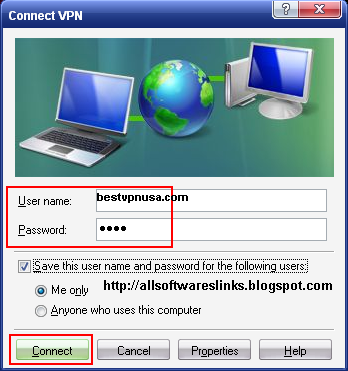
write bestvpnusa.com in hostname.

a shortcut will be at desktop, double click and enter the details and press on connect button.


write username : bestvpnusa.com
and Password : in its site CLICK HERE
wait for 4 sec then skip the ad


Friday, October 12, 2012

Windows XP Professional SP3 integrated October 2012 Pre-Activated


Windows XP Professional SP3 integrated October 2012 Pre-Activated

This is the original W!ndows XP Profess!onal SP3 (32-bit) ISO from M!crosoft. Including M!crosoft updates until 10.10.2012, !nternet Explorer 8, Adobe Flash Player 11.4 and SATA drivers.

This release is the best you could find on the net, because it's just simple:

  • NO tweaks or add-ons.
  • NO additional programs and software added.
  • NO graphics, scripts and wallpapers added or changed.
  • NO serial needed during installation, the key is already inserted.
  • It's just the original image from M!crosoft except updates, IE8, Adobe Flash Player (11.4.402.287) and SATA drivers!
  • Windows Messenger, MSN Explorer and Internet Explorer 6 were removed.


System requirements

  • Pentium 233-megahertz (MHz) processor or faster (300 MHz is recommended).
  • At least 64 megabytes (MB) of RAM (128 MB is recommended).
  • At least 1.5 gigabytes (GB) of available space on the hard disk .
  • Video adapter and monitor with Super VGA (800 x 600) or higher resolution.
Link download
Mirror via Sharebeast


How To Download Torrent Files Without Using Torrent Client


How To Download Torrent Files Without Using Torrent Client

Lots of people facing problems while downloading from Torrent Clients like utorrent ot bittorrent so today I am posting the trick by which you can download Torrent files from IDM.

Just follow These below simple steps :

Step 1. First Download and install IDM (Internet Download Manager).

Step 2. Now copy any Torrent link address or download the Torrent file.

Step 3. Now visit site zbigz.com .

Step 4. Paste the link Address or upload the Torrent File.

Step 5. Now click on Go Free.

That’s it !

Now the site where you have uploaded the Torrent File will download the whole torrent stuff and will give you the direct link and if got IDM, then the download will automatically start in IDM with maximum speed.

Note : If the file size is 1 MB, 100 MB, 1 GB or 5 GB or any size, IDM will download the whole file in once and there will be no Parts like in Hotfile or Rapidshare etc. It will also give Resume Capability, so that you can pause at anytime.

How To Increase Laptop Battery Backup


With the rise in laptop sales it is essential for laptop buyers to make sure they use their laptop batteries to the fullest and also make sure they can achieve the highest performance with the available battery. Generally most laptops claim to have 4-6 hours of battery life but in real it comes to half to the promised backup time because of many factors like heavy usage while on battery backup, running USB based gadgets, CD/DVD ROMs etc. You can also need to make sure about some battery life saving tips because the laptop batteries generally have a life of around 1000 recharge cycles. So here is some tips to increase laptop battery backup in some easy ways.

  1. Defrag regularly : The faster your hard drive its work – less demand you are going to put on the hard drive and your battery. Make your hard drive as efficient as possible by defragging it regularly. (but not while it’s on battery of course!) Mac OSX is better built to handle fragmentation so it may not be very applicable for Apple systems.

  2. Get rid of bloatware : Get rid of  all the useless software that comes bundles with laptops. You really don’t need all those monitors, recovery solutions and such, there are far better. Lighter and free data recovery alternative available. All of these programs running in the background not only slow down your computer, but also use up precious processing power which in turn depletes the battery. Even make sure that there are only essential items in startup, you don’t need iTunes , Adobe Updater and stuff to startup with your Laptop.

  3. Dim your screen : Most laptops come with the ability to dim your laptop screen. Some even come with ways to modify CPU and cooling performance. Turn them down to the lowest level you can tolerate to squeeze out some extra battery juice.

  4. Unplug external devices and empty disc drives : External devices like a USB external HDD, an iPod or mouse use power from the laptop to run. Therefore, unplug them so that all the battery power is used just for your laptop. If you want to watch a movie from removable media, copy it to your HDD and unplug the external device. Not only is it faster, that’s one less device using up previous battery power. Similarly, if you’re not using the optical disc drive, remove any discs from it because even if it’s not being read from or written on, the disc keeps spinning and using power.

  5. Avoid multimedia content and using speakers : Gaming or watching HD movies on battery power is not a good idea, it eats your battery really very fast. The graphics card works overtime and requires more power to render graphics or frames in a movie, specially HD ones. As much as possible, mute the sounds as well or use earphone/Headphones while watching a movie.

  6. Turn off connectivity services: When you’re not surfing the internet through WI-FI or transferring data through Bluetooth, turn them off to save battery power. Turning them on or off is just a key press away on modern laptops and shouldn’t be too cumbersome. Both these services require considerable power.

  7. Keep the battery contacts clean : Clean your battery’s metal contacts every couple of months with a cloth moistened with rubbing alcohol. This keeps the transfer of power from you battery more efficient.

  8. Hibernate not standby : Although pacing a laptop in standby mode saves some power and you can instantly resume where you left off, it doesn’t save anywhere as much power as the hibernate function does. Hibernating a PC will actually save your PC’s state as it is, and completely shut itself down.

  9. Update drivers : Although it’s not considered a direct connection, most newer drivers help devices perform more efficiently and thus consume less power. Furthermore, they can even offload processing tasks to specific components and not stress the CPU.

  10. Don’t multitask : Do one thing at a time when you’re on battery. Rather than working on a spreadsheet, letting your email client run in the background and listening to your latest set of MP3’s, set your mind to one thing only. If you don’t you’ll only drain out your batteries before anything gets completed.

After following all this tips I am defiantly sure that your battery backup time will increases much better than before.

Google Chrome OS Now Looks Like Windows, Google Chrome’s Latest Version


oogle Chrome OS Now Looks Like Windows

Google has come around to the OS side of things and decided to update their Google Chrome OS to be more.. well, traditional OS-y.

The original Chrome OS was all presented through a single browser window, that had side opening tabs and a special tab for installed applications. There were no additional menus, pop-ups or windows in the OS, and the minimalist design helped to produce a very streamlined user experience.

Apparently Google developers felt the OS needed a little more visually because the latest looks a lot more like, well, Windows.

The Original Google Chrome OS

The original Google Chrome OS, which launched in 2010, was designed to provide users with a single intuitive interface that didn’t use too many menus.

“Google has identified that users spend most of their time on a computer in a browser window (Internet Explorer, Firefox, Google Chrome, Safari ). They believe that most of the excess programs and applications are used, much less often – enough so, that they don’t need to exist in an OS. They also believe that most average operating systems take an extended period of time to boot initially (no detesting that fact).

Over time operating systems deteriorate in performance as more and more software is installed. Armed with all these aforementioned observations, Google has decided it would be beneficial to create an operating system that acts just as an internet browser. What that means is that every action performed on their the Chromium OS because it will obviously borrow from the design and function of Google’s  Chrome operating system – the new netbooks were branded with the Google Chromebook title.

The New Google Chrome OS

Google recently released a new updated to the developer version of Chrome OS, which changes the entire visual theme of the operating system. The new visual aesthetics and features are actually the first updates to the operating system’s user interface since launch.

The new Chrome OS update adds a more traditional desktop interface, which in turn offers separate application and browser windows. Basically Google has designed the Chrome OS to be more like a traditional operating system. The new Chrome OS version even has a popup taskbar which Google calls a ”shelf” , that offers quick shortcuts and convenient application icons to allow faster navigation options. The inclusion of the taskbar also gives birth to a similar feature (much like the Windows start-menu), which adds a more extensive list of available applications and programs.

Google is calling the interface redesign ‘Aura’.

Google has still maintained the “minimalist” design in the latest update, and they are still dedicated to providing a speedy piece of software. This new update will hopefully work to improve the Chrome OS and will work to expand its use to familiar territory. Google is obviously hoping that these new, and more traditional features will appeal to a larger audience.

Google Chrome OS Looks More Like Windows

Don’t get us wrong here, although the Google Chrome OS does look a lot more like Windows now than it ever used to, it still offers a completely different experience from other operating systems already out there. As we’ve mentioned above, Google is obviously trying to lure in a much larger audience by offering a familiar experience to most, and that’s exactly what this latest update offers.

Previously, the Chrome OS had a tendency to become very – inhibiting – as far as features go. Users could only navigate using a single browser window, and if they wanted to launch an installed application they were forced to open a new tab and browser a list.

Of course, we’re not attacking the classic Chrome OS interface, we’re just saying that sometimes its simple design got in the way and made things take a little longer than they should.

The new update opens a lot more opportunities and makes things run a lot smoother. We’re fairly confident that Google’s promises to maintain “speedy, simplicity, and security” with their Chrome OS hold up even with the latest update, and we’re looking forward to seeing what will come of these new features.