Showing posts with label website. Show all posts

Sunday, December 15, 2013

Add A nice Flash weather widget in your blogger blog or wordpress blog

You can use weather widget in your blogger blog to increase  your blog beauty and make it dynamic. so you can add it easily.

How to add weather widget in blogger

follow blew steps to add it in blogger................

1. Go to  Widgeo
2. click in Weather and see here blew picture


3. search your city name
4. now select any catagory
5. select no in adult option
6.check it like picture
7. finally click on Get Widget

now copy the giving code and go to your blog
1. click on layout>> add a widget>> html/java>>paste the code
then save the widget and save arrangement

Tuesday, December 3, 2013

How to add Free Live Traffic Feed In Blogger Blog And Wordpress or Website

Live traffic feed is a excellent widget for blogger,WordPress and website. if you place it in your blog you and you visitors see who visit your website from where and which post they see. it help to incress page views in your blog because visitors see others visit history. it also incress the beauty of your blog side bar. so let's
know how to do it.

Add a free Live Traffic Feed

2.  click on Click to Select for color setting. 1
3. select width to incress option 2
4. next option select number of traffic feed and check the box where visitors come from
5. now select your platform from option 3
6. for blogger check blogger option if you add it automatically.
If you add it manually in your blog then select other blog or website.
7. for automatically setup now click on  GO and follow next step it very easy.
 See blew screen shot and do it carefully


For manually check other blog or website and click on GO 
1. Copy the HTML code in next page
9. go to your blog Layout and select a add a gadget 
10 . now select HTML/Javascript widget
11. now paste the copied code.
12. click on Save and views what is change your blog or website.

its a free software that means cost free widget
 If you get any helpful trick from my blog please share my blog in your social media site ot timeline

Monday, December 2, 2013

How to automatically share your website or blog post in facebook and twitter


Facebook and twitter are best social activity site in internet. you can get many many and many visitors
 from social sites.so most of  blogger and website owner share their post in facebook and twitter.
 every one create a page for their blog or website  in facebook.
we post in our blog but we have
 no time to share those post in facebook and twitter. so I give you a solution for it. 


How to auto share your blogger post in facebook

complete blew steps for share your post in facebook
1. Go to your facebook and Log in your account
2. type  NetworkedBlogs  in your facebook search bar
3.then go to NetworkedBlogs apps and log in with your facebook accout . or click visit website
4.  then click Register a Blog  and give your blog infomation
5. then copy confimation apps code and place it in your blog with a HTML/javascript Gadget and after
confirmation  you can delete this gedget
6. now click in Syndication  and click Add your facebook target add your facebook page or profile
check you facebook timeline and page now your are succes. post in your blog and see result.
if face problem  then chcek whole steps again
 see this picture

How to Auto share your blog post in twitter

go to step no# 6 and click  in Add twitter Target and confirm with your account.


thanks to stay with me


Sunday, November 24, 2013

Submit Your website or blogsite in Google,Yahoo,Bing,Ask Search Eangine- search engine submit


After create a website or blog everyone want to get visitors. you can get visitor in many way in web. but the most effective and popular way is Search Engine. this is the best way to make a website or blog popular.
Now a days 90% internet users use  search engine for any thing around the web world.
so you can get more more and more visitor from search engine.
 now you need to submit your website or blog in search engine. today we submit your site in 4 search engine

How To Submit URL In Search Engine

Following blew steps you can submit your website in 4 search engine. 

Submit you website in Google


Google is the top search engine in the internet. most of all search through it.
submit you site in google by completing blew steps
1. go to this link google site submit 
2. complete the steps in picture


Submit your website in Bing

1. now go to here Bing site submit
2.type you website url
3. type captca code
4. submit

Yahoo site submission

2.now click Submit Your Site for Free
3. now you are redirecting to Bing

Ask site submit


It is not possible to submit a website to Ask.com. Although Ask.com is a search engine, it is a search engine with a difference. It is a questions and answers based search engine.

free website or blog submit in 20 search engine And DIRECTORY Submit-Trick Link


Submit your website or blog in search engine you get more visitor from search engine automatically.
search engine submit is always free.

Free search engine submit

so go to blew link
Free Search Engine Site Submit
here you see a  from like it.

1. type here your website URL Like http://tricklink.blogspot.com
2. your website name Trick Link
3. your email address here
now check the box in Terms
4. click on Submit Your Site

Sunday, November 17, 2013

How to Add a free generated privacy policy in blog or website -blogger and wordpress

Privacy policy is a common page in every professional blog or website. it is inform to visitors what kind of roll play here and data use purpose. If you want to publish Google adsense ads you must need privacy policy page because  it is a term and condition of google adsense.
So we generated a privacy policy page or post in online. and providing our blogger blog term and condition.

see also: add a nice contact us form in blogger

How to  generated  privacy policy for blogger 

you can create a privacy policy page or post by doing blew steps


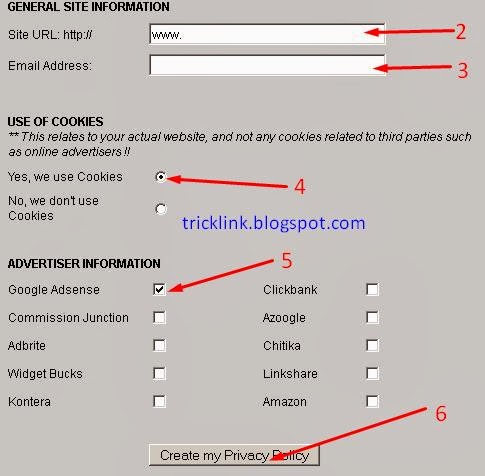
1. we create it online and 100% free. so go to here now  click me  
2. now put there your blog/website url in red marked 2. see blew picture
3. now type your email in  marked option 3
4.don,t forget to check it .
5. this is very important option for add ads publisher. if you  want to publish adsense ad check like picture.
if you use others network please check it carefully
6. now click on Create my privacy policy  

now check your email and copy the code which is sent by serprank  
7. now goto you blog layout and click add a gadget then select HTML/Javascript 
8.paste here your copied code. then save it

How to add privacy policy page

9. go to your blog dashboard   and click on pages. see here like blew


10. now click new page and select blank page then paste your copied code from serp rank and save it.
11. now publish it.   you can create a post for privacy and policy.
12. visit your privacy policy page or post and copy page or post link
see your blog like something blew picture


13. go to your blog templete and search privacy policy and paste link insted of #.

14 .save templete 
you are successfully done it.

Sunday, November 10, 2013

Add online visitors counter in blogger

 Today I share a small widget for blogger,which is online visitor counter.if you add this widget in your blogger visitor see what number of visitor is in your blog now. if they see some number of visitor is online in your blogger, they try to belief this blog has some useful content. then they visit your blog pages.
It also helpful for you to know online visitors.

 How to add online visitor counter in blog 

You can easily add this widget by following blew steps
1. Go to your blog.
2. click on Layout and then click Add a Gadget
3. select HTML/javascript
4. type in title>> Online Counter
5. paste blew code in content area

<!-- BEGIN: Powered by Supercounters.com -->
<center><script type="text/javascript" src="http://widget.supercounters.com/online_t.js"></script><script type="text/javascript">sc_online_t(400029,"Users Online","#ff0000");</script><br><noscript><a href="http://www.supercounters.com/">Free Tumblr Users Online Counter</a></noscript>
</center>


5. now click in save.
7. save arrangement and view your blog.
if you face any problem please comments

Submit your blog or website in 150 search engines in 5 minutes

Search Engine Submission


Auto Search engine submit

search engine is great source of visitors. 80% visitors visit your site from search engine.
so increase you visitor you need to submit your in search engines. there are hundreds of  search engine. If you submit you url one by one it give pain,it also kill your valuable time.   today I share a trick for do it easily.

1. go to here: free search engine submit  
2. see a new page copy 3 no code
3. place there code  in your website or blog( you remove this code after complete submission)
4. write here your website url


5. your email here.
6. check box of all search engine
7. click in submit your site
You get an email. after confarmation your  site is submitted
check your email, if any search engine want confirmation  through there give link you can confirm

Saturday, November 9, 2013

How to translate website or blog to other language

we are many times see a translator option in many blog or website. it helps visitor translate website or blog to desire language. you can use it for your blog or website. here I share how to add it in your blogger blog.
It is very easy to do this.

Add google website translator in your blog

you can add google website translator by following blew steps:

1. Go to here >> Google website translator  
2. sign in with gmail then click on Add to your website now  .see blew picture


3. now type your website url (www.tricklink.blogspot.com) on marked 1 then click next see blew page

4.now select all language  if you translate only your selected language then check the language box.
5. click in get code . now you see next picture like it

6. copy this code and go to you blog layout and click add a Gadget, then select text  like blew


7. paste here your copied translator code and click save.
congrasulation  you successfully done it

Friday, November 8, 2013

How to Add a favicon(logo) in your blog or website

Favicon is the icon or logo of your website. your can adjust simple or animated favicon in your blogger blog.
 it help visitors to separeted  your blog from others in title bar. it also incaress your blog beauty.
you can do this easily. today i share how to do this. i share how you can turn a picture to favicon. see the
picture
1. this is the default favicon in blogger.(1)
2. this favicon is after customize(2)
============================================

How to add a favicon in blogger

============================================

We do it by 2 steps

1. create and download favicon
2. add favicon in your blog

# step=1

I share here 2 website where you  will create your favicon. 

1. Favicon generator

This is a great website where you  can create your own picture turned favicon and choose a favicon from gallary. 
1. create favicon from your own picture. it is very easy. go here >> Favicon generator 
 see the blew photo.


1. browse or select a picture from  your computer.
>>  you can change Favicon  size.
2. now click in geneate Favicon
3. now click on Download Your favicon here. or see blew

.
>> now you successfully download logo  or favicon.

Download favicon from gallery

Go to  favicon gallery or see blew 


>> now select a favicon or Icon, logo and download it.

2. genfavicon.com 

This website is  also a favicon generate website. here you can customize your favicon or logo as your wish.
1. Go to genfavicon  and select a picture from your computer then click on  upload image
2. editing picture by using mouse. then click capture & preview. 
3.now download  favicon from download favicon style. see blew picture


# step=2

>> now we add favicon in your log.
>> Go to your blog >> blog layout >> in 1st widget where you see blogger logo click here edit. like blew


>> now click on  browse and select your created or downloaded favicon  then click save. follow blew

>> now save arrangement and view blog to see changed favicon.

please comments if you feel any problem.

Saturday, November 2, 2013

Add slider About Author profile

Slider About Author profile is one of the best widget for blogger platform I EVER SEEN.
"About me" is the hidden condition of adsence, but most of newbies do not know this secret.
abut me or about author is also help to blogger grow popularity.
it never increase page loading time beacuse it is HTML Code
---------------------------------------------
A about author by completing blew steps
-------------------------------------------
1. go to your blog
2. goto layout
3. click add a new widget and select HTML/Javascript
4. paste blew code
----------------------------------------------------------------------------------------------------------

 <h2 class="title">About Me</h2>
<div class="widget-content">
<!--[if !IE]> -->
<style>
}
#probloggertricks:hover
 {
border:2px solid #ccc;
cursor:pointer;
}
.opacity
{
opacity: 0.5;
margin-right: 50px;
-moz-transition: all 0.5s ease-out;
-o-transition: all 0.5s ease-out;
-webkit-transition: all 0.5s ease-out;
-ms-transition: all 0.5s ease-out;
transition: all 0.5s ease-out;
-moz-transform: rotate(7deg);
-o-transform: rotate(7deg);
-webkit-transform: rotate(7deg);
-ms-transform: rotate(7deg);
transform: rotate(7deg);
}
.opacity:hover
{
-moz-transform: rotate(0deg);
-o-transform: rotate(0deg);
-webkit-transform: rotate(0deg);
-ms-transform: rotate(0deg);
transform: rotate(0deg);
-moz-box-shadow: 1px 1px 4px #000;
-webkit-box-shadow: 1px 1px 4px #000;
box-shadow: 1px 1px 4px #000;
}

</style>
   <!--[endif]---->


<style>
#probloggertricks
{
border:2px solid #888; margin:2px 5px 0px 0px; padding:2px;
}
#profileAditya:hover
 {
border:2px solid #ccc;
cursor:pointer;
}

.opacity:hover
 {
opacity: 1;
-moz-box-shadow: 1px 1px 4px #000;
-webkit-box-shadow: 1px 1px 4px #000;
box-shadow: 1px 1px 4px #000;
}

</style>

<img class="opacity" id="probloggertricks" src="http://lh5.googleusercontent.com/-apebLD7wqCc/AAAAAAAAAAI/AAAAAAAAAbA/TEzvNCR6ubk/s512-c/photo.jpg" width="100" />
<div style="font-family: Arial Tahoma Verdana; font-size: 13px; text-align: justify; ">
<b>Founder & Author:</b> Hi Friends, my name is Ataur Rahman Dipto student of electrical and electronics engineering 20 year old blogger, certified SEO consultant & web developer , the Entrepreneur of <a href="http://www.tricklink.blogspot.com"> <b>Trick Link</b></a> who based out of the beautiful country name "Bangladesh". He is a problogger & running a number of blogs from his living room</div><a style="color:#5634;" href="http://tricklink.blogspot.com/about me.html" target="_blank">...Read More</a><!--![endif]---->
</div>
-------------------------------------------------------------------------------------------------------------

replace coloured code with your own

1.replace this color link with your image link

2. replace this color link with your Bio

3. change this link also with your about me page link

now save
you successfully done.

Add customize cloud labels in blogger~templete desingning


In blogger or website labels plays a vital role to stay visitors long time with your blog. because labels are shows what kind of post or content you already have. if it's random , you can customize it to incrage outlooking  and make it so beautifull. after doing it you see results   after some days. your page views are increse.
some of customize templete of blogger have it already but it not show as customize because it also depends on your blog labels setting. so you can do it simply but  if your not have it then you need to copy asn paste some code in your templete.  don't warry it so easy.

========================================================

Customize labels by following blew steps 

====================================================


Turn random to cloud:
1. Go to your blog layout
2. Click on edit option right side of Label, if you not see any widget of named label plese click Add new widget and slect Label widget from this page. then edit sttings like blew

3. click on marked check
4. now click in cloud check
5. save label configuration.
6. now click on  save arrangement and also click on view blog
7.are you see  like some thing in your blog labels area like blow picture

you have almost done and successfully customize lavels widget.
If you not see above picture, you must see here blew picture and you need to edit some code in templete.

9. go templete and backup your templete and click in Edit HTML
10. SEARCH  ]]></b:skin>
Place blew code before it.
-----------------------------------------------------------------------------
/*-----Custom Labels Cloud widget by www.MyBloggerTricks.com----*/
.label-size{
margin:0 2px 6px 0;
padding: 3px;
text-transform: uppercase;
border: solid 1px #C6C6C6;
border-radius: 3px;
float:left;
text-decoration:none;
font-size:10px;
color:#666;
}

.label-size:hover {
border:1px solid #6BB5FF;
text-decoration: none;
-moz-transition: all 0.5s ease-out; 
-o-transition: all 0.5s ease-out; 
-webkit-transition: all 0.5s ease-out; 
-ms-transition: all 0.5s ease-out; 
transition: all 0.5s ease-out;
-moz-transform: rotate(7deg); 
-o-transform: rotate(7deg); 
-webkit-transform: rotate(7deg); 
-ms-transform: rotate(7deg); 
transform: rotate(7deg); 
filter: progid:DXImageTransform.Microsoft.Matrix(
                    M11=0.9961946980917455, M12=-0.08715574274765817, M21=0.08715574274765817, M22=0.9961946980917455, sizingMethod='auto expand');
zoom: 1; 
}

.label-size a  {
text-transform: uppercase;
float:left;
text-decoration: none;
}
.label-size a:hover  {
text-decoration: none;
} 


-------------------------------------------------------------------------  

Save your templete
you successfully done 

Monday, October 28, 2013

How to show Author profile picture in google search

Now you can show your blog author profile image in google search results by complete today tutorial.
gogle search Engine has give us this advantage, most of new blogger do not know about it.
but it is very effective seo(search engine optimization) . if you do this visitor see your profile picture in their google search and visitor want to visit your blog or website. google search engine always try to place on top
which site has  show author image in search  results. so it has play a vital role for your website or blog.
it is also one kind of seo for you blog.

=======================================
 how to image show in search result
===========================================
You will need the following things to show picture in search reasult


1. you have own blog or website
2.you have an account of Google plus
3. you mast have  an about me page on blog/ website, if you don't have about me page, just create about me or just give a name about us .

Now follow blew steps:
STEP-1
A. on your blog /website header,footer or site paste blew code

------------------------------------------------------------------
<a href="https://plus.google.com/102374609863098638295"
  rel="author" target="_blank"> Join me on Google+</a>
------------------------------------------------------------------

B. Now replace 102374609863098638295   with your google + ID
c. GO TO YOUR Google + account and copy the disits from address bar like blew

step 2  
A. copy blew code and   paste  it in  your about me page 


------------------------------------------------------------------
 <a href="https://plus.google.com/GOOGLE+ ID"
  rel="me" target="_blank"> My Google Profile</a>


---------------------------------------------------------------------------------

B.  replace here your google + ID disits same way like above.

STEP 3    

1. GO TO you google +  and  click EDIT 
    2: Check show visibility in searh result if you found this option check this.
3. Click Links area and given your blog link
4. click edit profile and check     show this tab on my profile.
5.    Upload image to google plus account. if you have already uploaded image on                     google plus acount then no need to upload image. its ok

        Finaly save you account and you are almost done.


test this go to here Google search

How and why Add google custom search in your blogspot blog-- blogger designing

Add a google custom search engine in your blogger blog.
it help you to get blews benefits.
1. google search engic every body knows that.
2. ti is very popular name in internet.
3. google search similar word in your whole blog which is typed by visitor.
so go to start


=====================================================
Add customize custom search of google search engine by  folloing blew steps
=====================================================
1. go to here :  create custom search
2.  here you see a form  type here your blog  url and your type keywords similar to your blog
3. click on create  .
4. follow blew picture and click marked option

5. now you customize  custom search, click in  Look And feel free >> two page selected and  click save and get cod lik blew


6. copy this code and back to your blog layout and select a HTML/ javascript widget and
paste the copied code


Sunday, October 27, 2013

Add animated beautiful clock in your blogspot blog

Add animated flash clock in your blog.
 it  help you and your visitors see time when visit your blog.
it is very simple and light widget and it is create bad effect for your blog. but it increase your blog out look.
it is orginally create by 24work. so you need to go this blog for get code and there are many style clock.


================================================

Add clock in your blog by doing blew steps
================================================

1. Go to your blog and click Layout
2. add a widget
3. Add HTML/Javascript widget by click in + button
4. paste code here and then save it.

5. now save arrangement.
go to  blew link for get code
===============================================
===============================================


Saturday, October 26, 2013

How to add facebook box in blogspot with simple way.--blog designing

Facebook like box can help you to get popularity of your blog. You will see it most of blog of blogspot
platform. it is a common widget for all pro blogger.
It just for new blogger of blogspot.
now you add facebook likebox like blew


================================================================ 
Add like box by following steps ================================================================
1. go to >> Layout>> Add A New Widget
2. select  HTML/ Javascripts widget
3. copy blew code and paste it

---------------------------------------------------------------------------------------------------
<iframe allowTransparency='true' frameborder='0' scrolling='no' src='http://www.facebook.com/plugins/likebox.php?href=http%3A%2F%2Fwww.facebook.com%2Fpages%2FMy-Blogger-Tricks%2F147104632016744&amp;width=590&amp;colorscheme=light&amp; show_faces=true&amp;stream=false&amp;header=false&amp;height=180' style='border:none; overflow:hidden; width:590px; height:180px;'/>
-----------------------------------------------------------------------------------------------------


4. replace blue color text  with your link.
now a question come, how you get your page link. don't warry for get it by following steps
* first go to your page copy your page from address bar, without http://.   see blew

5. now replece back slash(/) with %2F
then it looks like blew code
www.facebook.com%2Fpages%2FTRICK-LINK%2F201883109935908


now code replace and  save widget.
Then save arrangement and enjoy.

If you face problem please comment

Add breaking news widget in your blogspot-blogger widget & seo

NEWS TIKET: News tiket is popular widget for blogspot blog. its makes your blog most popular 
and atractive. visitor want to visit your post when the see they visit easily. so by add this widget your
 blog page views are increase and your blog become reach your destination.


============================================================
Add breaking news widget 
=============================================================
adding breaking news widget is very simple. just following blew steps you can do it easily


1. go to your blog layout 
2. click add a widget
3. setect HTML & JAVA SCRIPTS widget
4. now paste here blew code

--------------------------------------------------------------------------
<script style="text/javascript" src="http://blogger-jquery-file.googlecode.com/files/buzzbd.js"> </script><script style="text/javascript"> var nMaxPosts = 20; var sBgColor; var nWidth; var nScrollDelay = 175; var sDirection="left"; var sOpenLinkLocation="N"; var sBulletChar="BREAKINGN NEWS»"; </script> <script style="text/javascript" src="http://tricklink.blogspot.com/feeds/posts/default?alt=json-in-script&callback=RecentPostsScrollerv2"> </script>

---------------------------------------------------------------------------- 

5.Edit blue color text with your blog url name
6. you can change  speed of scrolling text  increase or decrease  by change yellow color number. such
     as: if you want incerase speed please change it with 200. but decrease speed by 125.
7. you can change your widget name to as your wish by changing green color breaking news as like HOT TOPICS, HEADLINES Etc.

now save your widget and save arrangement  .
well done, you successfully do it

Add search keyword in every post in blogger-seo

Today we set search keyword in every post. which help us improve search rank . it is very simple to do.
it is also a seo and it  is a working tips.
Every new blogger in blogspot platform miss it first time. but it is very helpful trick.
so friends now start.
>> Go to your blog dashboad>>go your blog>> setting>> Search preferences.
Add here here your meta tag which can help search engine to get access your post easily.
see blew picture

  then save settings.


NOW go to create new post  and add here  search description. which is releted about your post.
see blow post>>>>


we almost done.
so enjoy blogging and stay with us.

Friday, October 25, 2013

Top 20 website of Alexa Rangking 2013 in world

Top 20 website of alexa rangking


1. www.google.com  

2. www.youtube.com

4.yahoo.com

5.baidu.com

6. wikipedia.org

7. qq.com

8. linkedin.com

9. twitter.com

10. live.com  

11. amazon.com

12. blogspot.com

13. taobao.com

14. google.co.in

15. wardpress.com

16. sina.com

17. yahoo.co.jp

18.yandex.ru

19.bing.com

20. ebay.com

Website Submitter - submits your website to 2,500+ places for FREE!

Today I share a trick  for submits your website or blog in 2500+ places for free by on click
in 4 minutes.
so go to blew link

IMTalk website submit   

Here you see blew picture and inter your website or blog address then  click on submit

1. type your website/blog name
2.select the number of page create
3. click on submit

 wait for creating pages.